Complete effortless HR solutions
Complete effortless HR solutions

Get the information you need to understand workforce trends, monitor key HR activities and support better-informed decisions.
ActionHRM brings HR reporting, visual dashboards and internal communications together in one configurable platform. Explore workforce data across recruitment, attendance, learning, performance, workplace safety and more, with flexible report filters and at-a-glance views that help you focus on what matters.
Clearer insights. Flexible reporting. Better-informed people decisions.

HR teams manage information across the entire employee lifecycle. But when data is difficult to access or scattered across separate reports, it can take too much time to understand what is happening and where action may be needed.
ActionHRM’s Intelligence & Analytics capabilities help bring that information into view. Use dashboards to review selected workforce indicators, run reports across functional areas and apply filters to focus on the people, departments, locations or employment types relevant to your question.
From headcount and turnover to training, performance and workplace safety, ActionHRM helps make HR information easier to explore.
Make your HR data more useful
The goal is simple: spend less time searching for information and more time using it to support your organisation.
See important workforce indicators at a glance
Dashlets turn selected HR information into visual summaries on the ActionHRM home page. Rather than running a report for every question, authorised users can access relevant indicators through a dashboard experience configured around their role and permissions.
ActionHRM provides more than 35 dashlets across the solution, including 15 available from the home page. Availability and configuration depend on your access permissions and the functionality included in your solution.
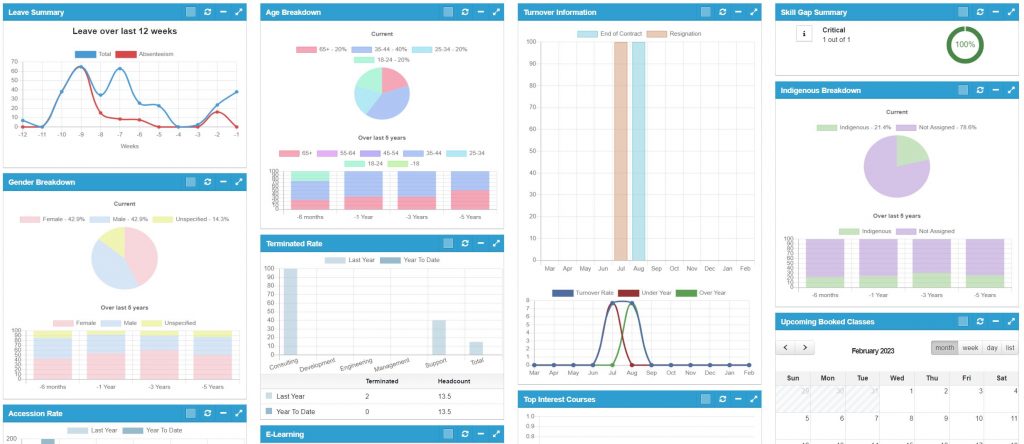
Review headcount and employee accession trends, turnover and termination rates, department-level comparisons and employee demographic breakdowns, where the relevant data is available. These views can help HR teams understand workforce composition and explore changes over time.
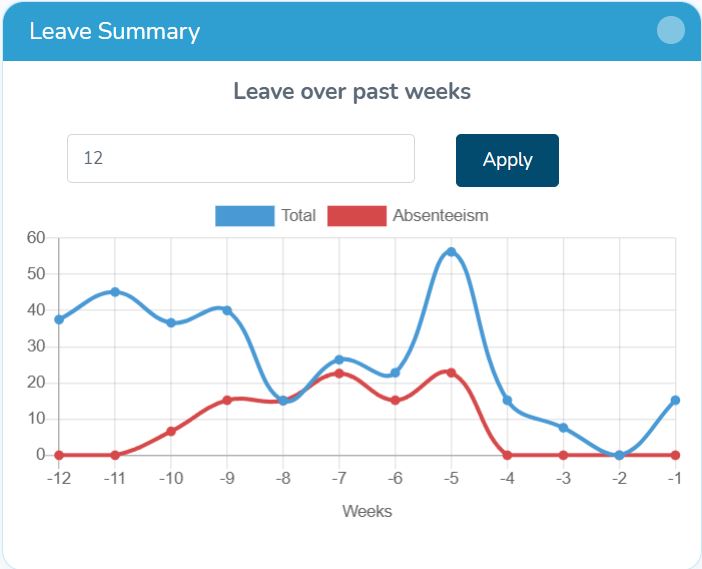
Use available dashlets to review leave summaries across a 12-week period and time variance graphs. These views can help managers and HR teams identify patterns that may warrant further investigation.
Access visual summaries relating to performance reviews, employee ratings, goal scores and feedback scores, including overall performance analytics, top-performer charting and performance review summaries.
Explore popular training courses, upcoming class schedules and availability, CPD records, skills-gap summaries, skills searches by job, position or role, and skills and position-attribute visualisations, to help identify capability and development areas to investigate.
Visual summaries of incidents and hazards by category, location and risk, alongside safety actions by priority and completion status. This helps authorised users review selected safety information without relying solely on detailed report outputs.
Additional dashlets include recruitment source and recruiter information, timesheet cost-code summaries and expense comparisons. The available views depend on the modules your organisation uses and the information recorded in ActionHRM.
Get beyond the headline numbers
Dashboards are useful for a quick overview. Sometimes you need to examine the underlying information, apply specific criteria or prepare a report for a particular business question.
ActionHRM provides more than 80 standard reports across its functional areas. Most standard reports support available filters and conditions, helping you narrow results to relevant parts of your organisation.
Access reporting across supported HR functions, with outputs available in CSV, Excel and PDF where appropriate. HTML and templated Excel outputs are also available in designated areas. You can review relevant information without starting every report from scratch.
Refine available report results using criteria such as department, job role, location, employment type and other fields and conditions available for the report, to focus on a specific team, workforce group or organisational question.
For more complex reporting, advanced filter settings can be saved as favourites for future execution, so teams can reuse frequently needed report configurations rather than rebuilding the same selection criteria.
Automated report scheduling is supported in selected areas of the solution. Depending on the supported reporting process, outputs can be distributed through standard email broadcasting or targeted through SFTP. Confirm scheduling options for the reports and destinations you require.
Ask more specific questions of your HR data
Standard reports provide a useful starting point. When you need a more targeted view, ActionHRM offers advanced filter and field-selection reporting options to help shape outputs around your information requirements.
Use available fields and conditions to focus on the information relevant to your question, taking into account your configured data and access permissions.
This flexibility can help HR teams investigate specific workforce topics, prepare internal reports and bring relevant information together for review.
For reporting needs that go beyond the available standard and advanced reporting capabilities, discuss your requirements with ActionHRM. Custom reports and additional data solutions may require further scoping.
Keep important updates in view
HR intelligence is not only about analysing information. It is also about making relevant communications accessible to the people who need them.
ActionHRM Wiklets provide a carousel-style communication area on the home page. Use it to publish organisational news, notices, messages and links to relevant internal or external resources.
Communications can be configured for the wider organisation or specific groups, subject to the available access and configuration options.
Examples of what you can communicate
Wiklets provide a central place for employees to see relevant information when accessing ActionHRM, helping connect everyday HR processes with internal communication.

Put the right information in front of the right people
Not every employee needs access to every report or dashboard. ActionHRM uses position-based access and permissions to help determine which home-page dashlets and information are available to employees and managers.
This allows the experience to be shaped around organisational roles, subject to your system configuration and access rules.
When planning your reporting approach, consider which workforce indicators are relevant to HR, managers and other authorised users. Appropriate access controls are particularly important when reporting involves sensitive employee or demographic information.
One HR platform. Multiple views of your people data.
Workforce questions often cross functional boundaries. You may want to understand how workforce trends relate to recruitment, how skills gaps connect with training needs, or how attendance and safety information change over time.
ActionHRM provides reporting and dashlets across its HR functional areas, helping authorised users explore information from the modules included in their solution.
Available views can include:
The information available depends on the modules implemented, the data recorded and the permissions assigned to each user.
Explore your extended reporting requirements
Some organisations require more advanced visualisation, data warehousing or business intelligence capabilities beyond standard HR reporting.
ActionHRM can support database feeds for common BI and data warehousing tools. These requirements are not part of the standard out-of-the-box feature set and need to be reviewed and scoped with the team.
If you are considering broader workforce analytics, discuss the questions you want to answer, the data sources involved and your preferred reporting environment.
This helps establish a practical path for determining what is available within ActionHRM and what may require additional technical work.
ActionHRM includes HR dashboards and dashlets, more than 80 standard reports across functional areas, advanced filter and field-selection reporting, and Wiklets for internal communications. Selected reports can also support scheduling and distribution.
Available dashlets cover a range of HR information, including headcount, turnover, demographics, leave and attendance, recruitment, performance, training, skills gaps, timesheet costs, expenses and workplace safety. Availability depends on your modules, data and access permissions.
Yes. Most standard reports support filters and conditions, such as department, job role, location and employment type where applicable. Advanced filter settings can be saved as favourites for future use.
Automated scheduling is available in selected areas of the solution. Supported outputs can use standard email broadcasting and SFTP targeting where available. Confirm the requirements for your specific reports and distribution destinations.
ActionHRM provides advanced filter and field-selection reporting capabilities. Requirements that go beyond available reporting functions may require a custom report or further scoping.
Wiklets are carousel-style communication tools on the ActionHRM home page. They can display company news, messages, notices and links to relevant resources, with communications configured for the organisation or specific groups.
Advanced BI integration is not included as a standard out-of-the-box feature. ActionHRM can support database feeds for common BI and data warehousing tools, subject to discovery and scoping.
ActionHRM uses position-based access and permissions to determine access to relevant information, including home-page dashlets. Specific access depends on your system configuration and security settings.
Bring workforce dashboards, flexible reporting and internal communications together with ActionHRM Intelligence & Analytics.
Explore how ActionHRM can help your HR team find relevant information, monitor workforce trends and support better-informed decisions.
